

The Wix vs WordPress question is rarely about which platform is stronger. It is about how much of your site you want to own, how large the content will grow, and who will maintain it after launch. Closed platforms trade control for convenience. WordPress does the reverse, and asks for discipline in return.
What really separates Wix vs WordPress and Squarespace?
Wix and Squarespace are closed systems. The hosting, the editor, the templates and the updates all sit with the company that owns the platform, and you build inside the limits it sets while the subscription runs. WordPress is open software installed on hosting you choose, so the files and the database belong to you, and keeping them updated and backed up becomes your responsibility.
None of this is visible in a screenshot. All three produce a good looking site. The difference surfaces about a year in, when you ask for a feature the platform does not offer, or your page count reaches the hundreds, or you decide to move.
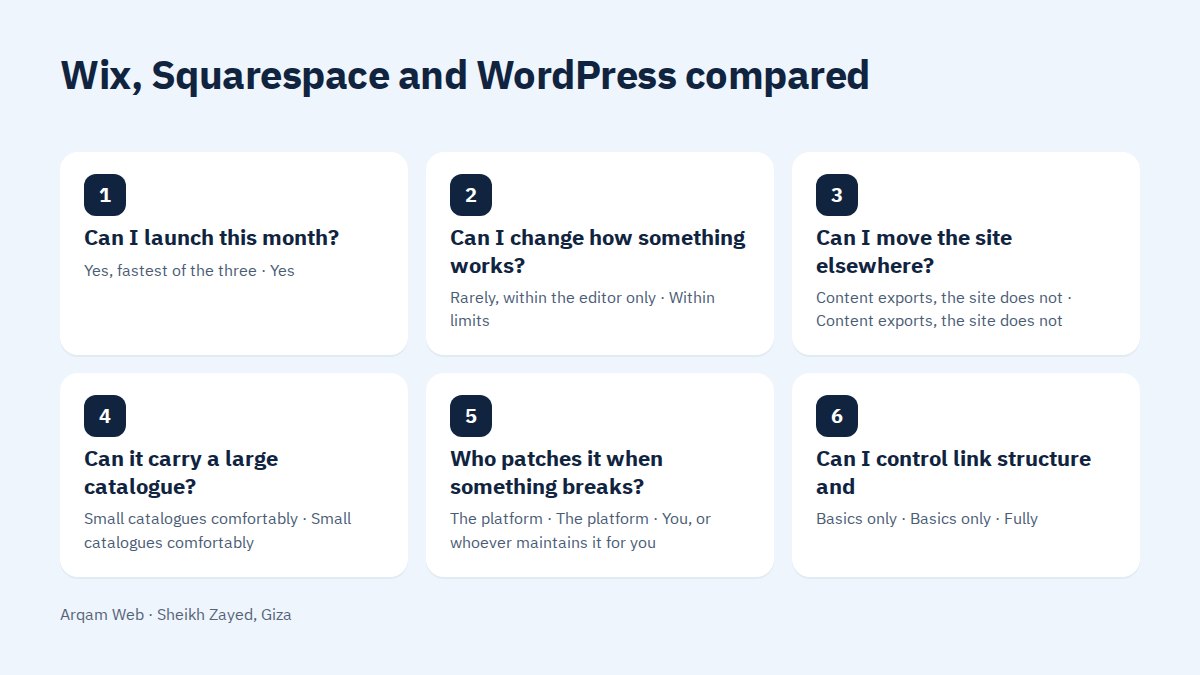
A side by side comparison
| The question an owner actually asks | Wix | Squarespace | WordPress |
|---|---|---|---|
| Can I launch this month? | Yes, fastest of the three | Yes | Only with hosting and a theme prepared first |
| Can I change how something works? | Rarely, within the editor only | Within limits | Yes, down to rewriting the theme |
| Can I move the site elsewhere? | Content exports, the site does not | Content exports, the site does not | Yes, database and files move together |
| Can it carry a large catalogue? | Small catalogues comfortably | Small catalogues comfortably | Yes, with WooCommerce or a custom build |
| Who patches it when something breaks? | The platform | The platform | You, or whoever maintains it for you |
| Can I control link structure and schema? | Basics only | Basics only | Fully |
The honest case for a closed platform
Plenty of businesses are better served by a subscription, and for them the Wix vs WordPress answer sits on the closed side. A closed platform makes sense when:
- The site is five pages and will stay five pages. A visitor needs your services, your address and a way to call you.
- Nobody on your side will do maintenance. With no technical staff and no support contract, an open platform drifts into an outdated, vulnerable site within two years.
- You are testing demand. A modest page that proves people want the service beats an expensive build for a business that has not been validated.
- The launch date is the constraint. Being online in ten days can outweigh a ceiling you reach in year three.
When an open platform earns the extra work
The turning point is when content becomes the asset rather than the container. Hundreds of service pages, a catalogue that grows monthly, several content types each needing its own template: these need a system where you define structure rather than fill a form.
A published example you can open yourself is the CID Group project. Its project page states that CID Group Egypt manufactures and exports Egyptian marble, limestone and granite to contractors, developers and importers, and describes the work as moving the entire product catalogue and content off Wix and onto WordPress, with the code and the performance under our control. That is the Wix vs WordPress decision in real life rather than in theory: the company launched on a closed platform, then needed something the platform did not allow.
Online stores: where the gap widens
For a short catalogue with simple shipping, the built in stores on Wix and Squarespace are fine. In a Wix vs WordPress comparison for stores, the strain appears with product variations, brand level sections, several shipping rules and local payment methods.
The Boya Store project is a useful reference here. Its project page describes a WooCommerce store for a multi brand paint retailer, and says the store is live in Arabic and English across five categories and seven brands, each brand with its own section, with a dashboard so the team loads and manages products themselves, and payment by Visa, Fawry and cash on delivery. That combination of two languages, brand sections and local payment is where an open platform stops being optional.
Wix vs WordPress for SEO: what actually changes?
For search, the platform is not what decides whether you rank. Content that matches what people search for comes first on all three systems. What changes is the ceiling of technical control.
WordPress lets you set link structure, add structured data per content type, shape sitemaps and category pages, and resolve duplicate URLs. Closed platforms hand you the basics already configured and stop there. On a six page site you will never feel the limit. On a wide service site it becomes the whole argument. Read types of websites to work out which of them you are actually building.
What you own, and what you can take with you
Ownership is the clause that ends the Wix vs WordPress debate for a lot of companies, and the one most people skip until it is too late. On a closed platform the design and the page structure are tied to the platform. You can export text and products, but rebuilding starts from an empty page. On WordPress, a database dump and a files folder are enough to run the same site on different hosting.
One question tests it: if you changed supplier or host in two years, what exactly would be handed to you?
Five questions that settle the choice
These five turn Wix vs WordPress from a matter of taste into a decision you can defend:
- How many pages in two years, not today? The projected number decides the system.
- Who updates content, by name? If the answer is nobody, choose the closed platform or sign a maintenance agreement.
- Which features are non negotiable? Test them against each platform’s limits before you pay, particularly payment, shipping and reporting.
- What does exit look like? Ask what you receive if you leave.
- What does three years cost, all in? Add subscriptions, maintenance and development together. Our breakdown of website cost in Egypt lists the items people forget.
Frequently asked questions
Is WordPress harder to use than Wix?
The editor is comparable now for everyday tasks such as adding a page or a product. The real difference is behind the screen: updates, backups and plugin choices. Day to day publishing is not the hard part of WordPress, and the maintenance around it is.
Can I migrate from Wix to WordPress later?
You can migrate the content, not the site. Text, images and products transfer, while the design is rebuilt. The part that decides whether a migration hurts is redirecting old URLs to their new addresses, so search results you already earned keep working after the switch.
Which one is cheaper over three years?
It depends on what the site has to do. A small closed platform site usually costs less in total, because the subscription covers hosting and maintenance. Once you need custom features or a large catalogue, workarounds on a closed platform tend to cost more than building it properly once.
Where does Squarespace fit in a Wix vs WordPress debate?
Squarespace suits visual businesses: portfolios, photography, work that sells an image more than a paragraph. Its templates are tidy and its limits resemble Wix. For a large catalogue or a steady publishing programme it is not the natural choice, and the comparison narrows back to the other two.
Is WordPress safe enough for a business site?
A maintained WordPress site with few trusted plugins and regular backups is safe enough for most businesses. Sites that get compromised are usually neglected ones running old versions and abandoned plugins. Security here is an operating habit rather than a feature you buy once at launch.
Want an opinion on your own case?
Send the address of your current site if you have one, the page count you expect, and what the site needs to do. You will get a written answer naming the platform we would pick, why, and what a move would cost you later if you take the easier route now.
Request a quote · Message us on WhatsApp · Call us
Arqam Web
44 Central Axis, Al Saraya Mall, Lower Ground, Entrance 2, Sheikh Zayed, Giza, Egypt
Phone and WhatsApp: +20 111 872 1404 · Email: info@arqamweb.com