

You secure a WordPress website with five habits, not with one clever tool: current updates, logins protected by unique passwords and two step verification, a short list of plugins from their original sources, a backup you have actually restored, and a host that treats security as part of the service.
Why do attackers keep finding WordPress sites?
The reason is not a weakness in WordPress itself. WordPress runs a very large share of the web, so an attacker who writes one tool against it can aim that tool at millions of addresses. Almost nothing reaching an ordinary business site is personal: a script walks a list of domains, checks the version of a known plugin, and tries common passwords on the login page.
Where does the work to secure a WordPress website start?
It starts with accounts, not with plugins. In the sites we have cleaned up, the entry point was almost always one of three: an administrator account with a password reused elsewhere, a plugin or theme months behind on updates, or hosting credentials passed around a team by email.
So the first piece of work is a user review. Delete every account for someone who no longer works on the site, drop anyone who does not need the administrator role, give each remaining account a long and unique password held in a password manager, and turn on two step verification for everyone who can reach the dashboard.
What your host covers and what you cover
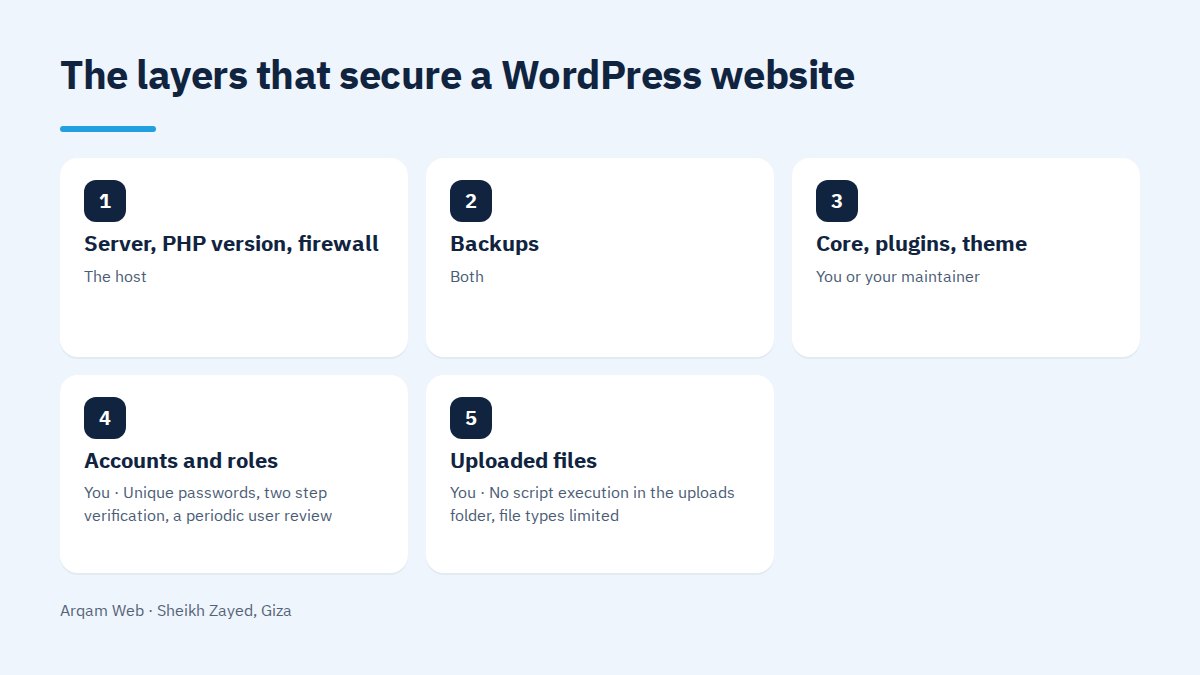
Two parties secure a WordPress website together, and most gaps sit in the space between them where each assumes the other has it:
| Layer | Who owns it | What to confirm |
|---|---|---|
| Server, PHP version, firewall | The host | A supported PHP version, a valid SSL certificate, your account isolated |
| Backups | Both | One copy with the host, one you control elsewhere, both proven restorable |
| Core, plugins, theme | You or your maintainer | Regular updates, unused code removed, a known source per plugin |
| Accounts and roles | You | Unique passwords, two step verification, a periodic user review |
| Uploaded files | You | No script execution in the uploads folder, file types limited |
One question tells you a lot about a hosting plan: if the site is compromised tomorrow, who restores it and from which copy?
How should you handle plugins and themes?
Plugins are where most attempts to secure a WordPress website fall apart. A plugin is not dangerous by nature, but it is third party code running inside your site with wide permissions. The rules we hold to:
- Install from the original source only. Cracked themes are the commonest way hidden code gets planted, and the price of that free download is the site.
- Check the last update date first. A plugin whose development has stopped keeps every vulnerability already published about it.
- Delete what you do not use. A deactivated plugin still has its files on the server, and those files can still be reached.
- Keep the count low. Every extra plugin is another surface to attack and another thing that can break.
- Update on a staging copy first wherever income depends directly on the site working, a store above all.
The order in which to secure a WordPress website
The sequence matters. Each step prevents more real incidents than the one below it:
- Close the accounts. A unique password per administrator, two step verification, old accounts deleted rather than left idle.
- Update everything and turn on automatic updates for security releases at minimum.
- Limit login attempts from one address, and stop error messages that reveal a correct username.
- Run a daily backup stored off the server, and restore it once as a test before you need it.
- Disable file editing from the dashboard and block PHP execution inside the uploads folder.
- Put a firewall in front of the site so suspicious requests are filtered before WordPress sees them.
- Monitor. Keep a login log, alert on core file changes, and watch security notices in Search Console.
The first four steps cover most of what we see happen.
Why the backup is the part that saves you
A backup is the last line in any plan to secure a WordPress website, and the line that does the rescuing. Everything above it lowers the odds without removing them, and once a site goes down the only question left is how far the newest clean copy sits from this moment.
Three things separate a real backup from a checkbox: it lives somewhere other than the server it protects, it holds database and files together, and it has been restored onto a test domain once. A copy nobody has restored is a hope.
How do you know a site has been broken into?
The early signs are plainer than people expect: pages you never published showing in search results, phone visitors redirected elsewhere while desktop looks fine, an administrator account you did not create, a security message in Search Console, or a sudden slowdown with unexplained server load.
When you suspect it, work in order. Copy the current state before changing anything. Change every password, the database and hosting panel and FTP account included. Sign out all sessions, then compare the WordPress files against a clean copy of the same version. Cleaning half an infected site brings the problem back within days.
Can one security plugin secure a WordPress website?
A security plugin earns its place: it limits logins, scans files, and reports changes. What it cannot do is fix a reused password, update a theme whose author has vanished, or create a backup you never configured. Security is an ongoing responsibility with a named owner, not a switch flipped at launch.
For a practical look at what your own site carries, read website components and web design mistakes, the web design and development page for what we handle here, and the pricing page for our service ranges.
Frequently asked questions
Is WordPress a secure platform?
WordPress core is reviewed and patched continuously, and the risk sits around it: an abandoned plugin, a cracked theme, a weak password, or cheap hosting with no isolation. A properly configured WordPress site is no less safe than a custom build with the same standard of setup.
How often should WordPress and its plugins be updated?
Security releases should be applied as fast as possible, and automatic updates are the simplest way to guarantee that. Larger feature updates deserve a staging test first, especially on stores. A weekly look at the update list suits most company sites, with a backup before any major change.
Does an SSL certificate protect the site on its own?
No. The certificate encrypts traffic between visitor and site, which stops data being read or altered in transit. It does nothing against a login with a stolen password or an exploited plugin flaw. A certificate is a baseline requirement today, not a substitute for the other layers.
What decides the cost to secure a WordPress website?
Size, plugin count and hosting type decide most of it, along with whether you want a one time hardening pass or monthly care with backups and monitoring. A brochure site is far lighter than a store holding orders and customer records. Our ranges sit on the pricing page.
Does a hacked site lose its search rankings?
It often does. Google may attach a warning to your result or drop injected pages from the index, and performance stays depressed after the cleanup. Recovery needs the infection fully removed and then a review request through Search Console, which is why noticing early costs far less.
Have your site security checked
Send us your site address and you will get a reading of its current state with an ordered list of what it would take to secure a WordPress website properly, with no obligation.
The official reference for the settings above is the Hardening WordPress guide on the developer handbook.
Request a quote · Message us on WhatsApp · Call us
Arqam Web
44 Central Axis, Al Saraya Mall, Lower Ground, Entrance 2, Sheikh Zayed, Giza, Egypt
Phone and WhatsApp: +20 111 872 1404 · Email: info@arqamweb.com