

An XML sitemap is a file that lists the pages you want search engines to find, with the date each one last changed. It does not force Google to index anything. What it does is shorten the discovery step and, more usefully, hand you a report naming the pages Google read and the pages it rejected.
What an XML sitemap does, and what it cannot do
The file makes one statement to a crawler: these are the addresses I consider canonical, and this is when each was last edited. It helps with discovery, not with ranking. A page listed at the top still needs content that deserves to appear and an internal link reaching it.
Two beliefs cause most of the confusion. The first is that listing a page guarantees indexing. The second is that leaving a page out keeps it hidden. Neither holds, because crawlers follow links long before they read your file. An XML sitemap is a second route to pages sitting several clicks from the homepage.
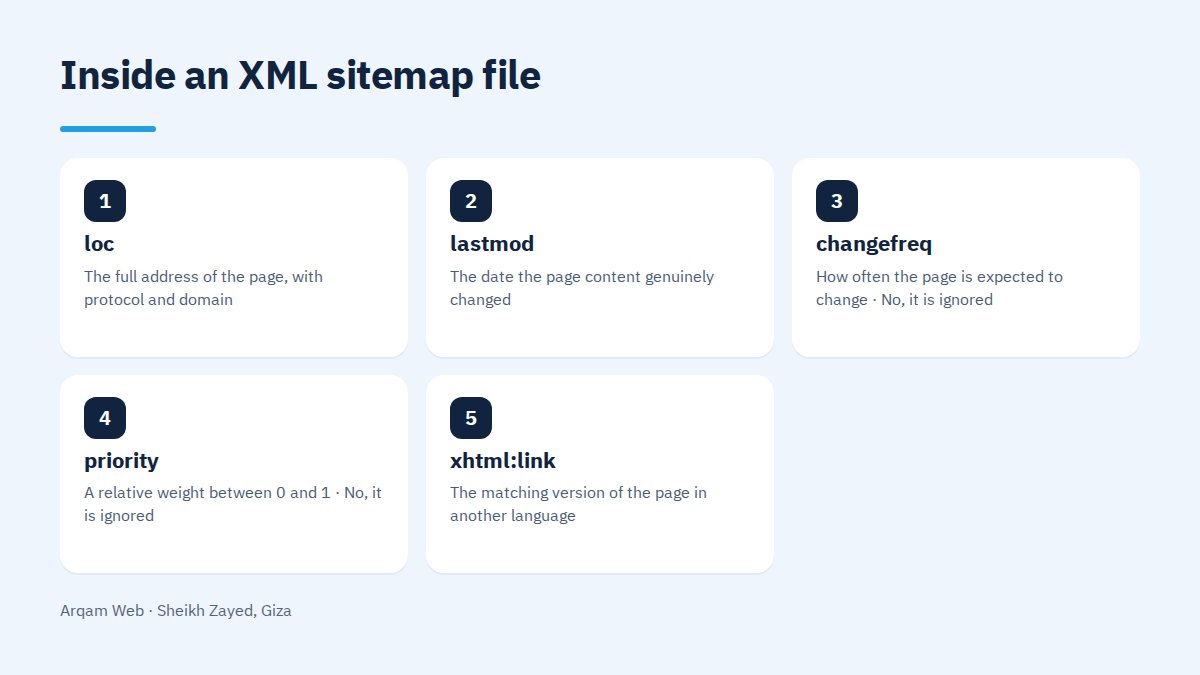
What is actually inside the file?
| Tag | What it carries | Does Google use it |
|---|---|---|
| loc | The full address of the page, with protocol and domain | Yes, and it is the only required tag |
| lastmod | The date the page content genuinely changed | Yes, when it is honest and consistent |
| changefreq | How often the page is expected to change | No, it is ignored |
| priority | A relative weight between 0 and 1 | No, it is ignored |
| xhtml:link | The matching version of the page in another language | Yes, on multilingual sites |
The practical instruction is short. Get loc and lastmod right and ignore the rest. A clean file with two tags beats a decorated one where half the values were invented by the plugin.
Which sites gain the most from an XML sitemap?
- Large sites with hundreds of pages spread over nested sections.
- New sites that no external link points to yet.
- Shops that add and retire products every week.
- Orphan pages that no internal link reaches from anywhere.
- Bilingual sites, since the file is the tidiest place to declare which page pairs with which.
A seven page brochure site with a sensible menu will not behave differently either way. It still gains one thing from an XML sitemap: the report tells you how many addresses were read against how many were indexed.
Does your site already have one?
Try three addresses in order: your domain followed by /sitemap.xml, then /sitemap_index.xml, then /robots.txt to look for a line starting with the word Sitemap. Nearly every content management system generates the file unasked, so the useful question is rarely whether one exists. It is what ended up inside it.
How do you check an XML sitemap is correct?
- Open the file in a browser. It should render as a list of addresses, not an error page and not an empty document.
- Pick ten addresses at random and open them. Each should land on the final page directly, with no redirect and no missing page message.
- Compare the count against how many pages you have published. A wide gap either way means the tool includes what it should not, or drops what it should keep.
- Look for addresses that do not belong: internal search results, empty tag archives, print versions, cart and account pages.
- Check the domain form matches. If the site runs on https with www, every address in the file needs writing that exact way.
- Submit it in Search Console and read the sitemaps report a few days later, since that report is what names the exclusions and their causes.
Run the same check after any change to your URL structure and after any migration. Most broken files we find were fine on launch day and broke quietly later, during an edit nobody connected to the sitemap.
What makes the file worthless?
- Redirected addresses. Listing an old address that forwards to a new one sends the crawler the long way round for no reason.
- Blocked addresses. A page you disallow in robots.txt, or mark noindex, does not belong in a list of pages you say matter.
- Dishonest modification dates. A file claiming every page changed yesterday throws away the whole value of the signal.
- Non canonical pages whose canonical tag points elsewhere, which means your site contradicts itself in two places.
When do you need several files and an index?
The published limit is 50,000 addresses or 50MB uncompressed per file, but splitting pays off well before either ceiling. One file for services, one for articles and one for products means the indexing report points at the failing group instead of a vague total. An index file gathers them under one address.
On the Forsan Pools project, a pool service company in Riyadh, the site was built on 183 pool service pages, and the project page records that the structure was settled before the design and that the schema and sitemaps went in during the build. At that scale, one XML sitemap hides a fault and a split set exposes it.
Who updates the XML sitemap, and how often?
On a site running a content management system, the SEO plugin rewrites the file every time you publish. Your job is auditing rather than updating: a quick look once a quarter, plus an immediate look after a migration, a URL change, or the deletion of a whole section.
On a custom coded site the file belongs to the developer, and it should be generated from the database rather than typed by hand. A hand written file falls behind within weeks and becomes a record of what the site used to be.
Frequently asked questions
Do I have to submit the file to Google by hand?
Not strictly. A crawler finds the XML sitemap from the Sitemap line in robots.txt on its own. Submitting it inside Search Console gets you the detailed report though: addresses read, last read date, and errors named individually. That report, rather than faster discovery, is the real reason to submit by hand.
How many addresses can one file hold?
50,000 addresses or 50MB before compression, whichever arrives first. Past either point you split the addresses across several files gathered by one index file. In practice we suggest splitting at a few thousand, not because the rules demand it but because a split set makes errors readable.
Should pages I keep out of search appear in the file?
No. The file is a list of what you want found, so including a page you block or mark noindex sends two opposite messages at once. Thank you pages, cart pages, account dashboards and internal search results all come out of the file without exception.
Do I need an HTML sitemap as well?
One is for visitors and one is for crawlers, and neither covers for the other. An HTML version earns its place on a large site as a page gathering every section with real internal links. On a small site it is decoration, and a well ordered menu does the same job better.
What does a sitemap could not be fetched error mean?
It means the crawler asked for the file and did not receive it. The usual causes are a wrong address, a robots.txt rule blocking it, a slow server, or a firewall turning crawlers away. Open the address in a private window. If it loads for you but not for Google, the blocking is the problem.
Have your sitemap checked
Send your site address and we will read your XML sitemap the way a crawler does, then list what should come out, what is missing, and which addresses are broken. See also the web design and development page, website components and the pricing page.
The official documentation for the format and its limits is the Google sitemaps guide.
Request a quote · Message us on WhatsApp · Call us
Arqam Web
44 Central Axis, Al Saraya Mall, Lower Ground, Entrance 2, Sheikh Zayed, Giza, Egypt
Phone and WhatsApp: +20 111 872 1404 · Email: info@arqamweb.com