

Website security basics come down to five layers: regular updates, strong passwords with two-factor authentication, limited permissions per user, backups whose restore has been tested, and a host that takes its own share of the work. Most break-ins on company sites needed no real skill. They used one of those five layers while it stood open.
How does a site actually get hacked?
The picture of somebody sitting down to target your site specifically is rarely what happens. A script scans thousands of sites looking for one known hole, and yours appears on the list because it runs the same outdated plugin as the others. Website security basics are about consistency rather than cleverness.
- An old plugin or theme. A hole is published when it is patched, so anyone who did not update becomes a known target.
- A reused password. A password used on another service that later leaked opens the dashboard with no effort at all.
- A pirated copy. A paid theme downloaded for free usually arrives with a back door buried in the files.
- Neglected shared hosting. An infected site on the same server can reach the rest when isolation is weak.
- A former employee’s account. Administrator access that stayed open after the work ended.
Where do the website security basics start?
The order below buys the most protection for the least time, and all of it fits inside a day on an ordinary company site:
- Turn on two-factor authentication for the dashboard, the hosting account, the domain registrar and the email.
- Update everything, then set security updates to install themselves, and delete deactivated plugins instead of leaving them in place.
- Audit the users. Any account you cannot name gets deleted, and anyone who does not need administrator rights gets moved down.
- Run a daily backup stored off the server rather than on it.
- Install an SSL certificate and confirm every page serves over HTTPS with no exceptions.
- Add an application firewall to stop repeated login attempts and block known attack patterns.
Who owns each layer?
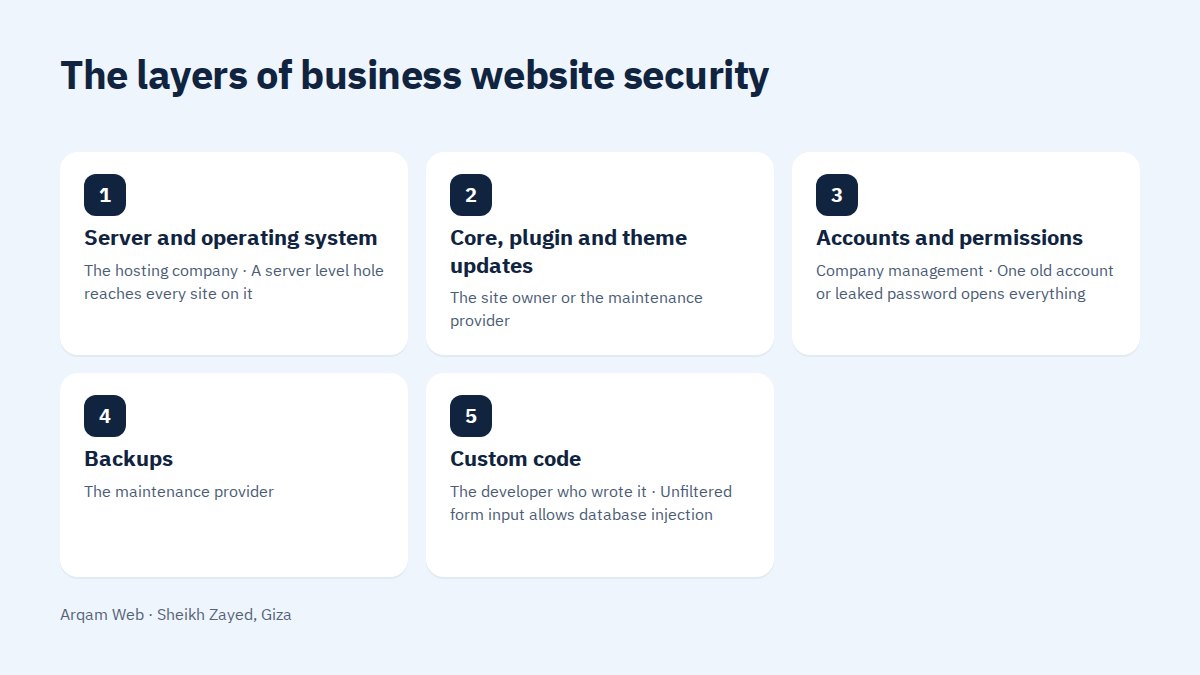
Website security basics are split across several parties, and a good share of incidents happen because each one assumed another had it:
| Layer | Owner | What happens when it is skipped |
|---|---|---|
| Server and operating system | The hosting company | A server level hole reaches every site on it |
| Core, plugin and theme updates | The site owner or the maintenance provider | Months of a published hole, on a list of known targets |
| Accounts and permissions | Company management | One old account or leaked password opens everything |
| Backups | The maintenance provider | A break-in with no restore point, repaired from nothing |
| Custom code | The developer who wrote it | Unfiltered form input allows database injection |
Write that table into the maintenance contract with a named party on every row. The layer nobody owns is the one that breaks.
What is wrong with pirated plugins and themes?
A paid theme you found for free is not a gift. Whoever edited those files and uploaded them did not do it out of generosity, and the price is usually a small piece of code that sends your site’s data elsewhere or opens a door used months later.
Worse, that kind of code is hard to find, because it lives inside legitimate theme files and never appears in the plugin list. Comparing files against an original copy is the only practical check, which is reason enough to treat buying from the source as part of the website security basics. Our page on web design mistakes covers where this usually begins.
Do website security basics include backups?
A backup prevents nothing, but it decides whether an incident lasts two hours or two weeks. Between two sites hit by the same attack, the difference is whether a clean restorable copy exists.
Three conditions make a backup real: it lives off the same server, it covers files and database together, and its restore has been tested at least once. An untested backup is an assumption rather than an asset.
How do you know a site has been hacked?
The signs are usually undramatic, which is why they go unnoticed for weeks. Watching for them belongs to the website security basics rather than sitting outside them. The common ones: pages nobody created appearing in search results, visitors redirected to a strange site on mobile only, sudden slowness with no clear cause, a security message from Google inside Search Console, and a new administrator account nobody added.
Check the uploads folder too. An executable file sitting inside the images directory has no innocent explanation.
What do you do in the first hour?
- Delete nothing. Take a copy of the current state before any change, because it is your evidence of how they got in.
- Change every password, including hosting, the database, FTP accounts and email.
- Sign out all sessions and remove any user you cannot account for.
- Restore the last clean copy, then update everything before publishing again.
- Request a security review from Google once the site is clean, if it was flagged.
A week later, read the logs again. A break-in that returns after the repair means the back door was never removed.
How much does hosting affect website security basics?
More than most owners expect. A cheap plan on a crowded server with poor isolation makes your work on the other layers worth less, because the way in may not be your site at all.
Ask four questions before subscribing: is there isolation between sites, is a daily backup included and where is it stored, is an application firewall available, and how fast is the reply to a security ticket. The answers separate hosting from storage space. What we handle sits on the web design and development page, and the parts themselves are explained in website components.
Frequently asked questions
Is WordPress insecure?
The software itself ships security updates regularly, and the problem is usually not the core but an abandoned plugin, a pirated theme or a weak password. An updated WordPress site with controlled permissions and two-factor authentication is as safe as any company site needs to be.
Does an SSL certificate protect a site from being hacked?
No, and this is a common mix-up. The certificate encrypts traffic between visitor and site, which stops interception along the way. It does not stop anyone signing in with a leaked password and it does not close a hole in an old plugin. It is one layer among several.
How often should a site be updated?
Review updates weekly at a minimum, and apply security updates immediately rather than on a monthly schedule. Take a backup before every large update, then open the site and confirm the forms, the cart and the main pages still behave as they did before.
Do I need a monthly maintenance contract?
If nobody on your team follows updates, backups and logs, then yes. A contract turns this from something a person sometimes remembers into a responsibility with a named owner. Ranges sit on the pricing page, and the choice depends on the size of the site.
What is the difference between a firewall and a scanner?
A firewall works before entry, blocking suspicious requests and password guessing. A scanner works after, comparing files against an original copy and reporting anything odd. Together they cover prevention and detection. Either one alone leaves a gap in the website security basics.
Have your site checked
Send your site address and your hosting type, and you will get a list of what is open right now and what to fix first, with no obligation.
Request a quote · Message us on WhatsApp · Call us
Arqam Web
44 Central Axis, Al Saraya Mall, Lower Ground, Entrance 2, Sheikh Zayed, Giza, Egypt
Phone and WhatsApp: +20 111 872 1404 · Email: info@arqamweb.com