

The Digger Hub case study covers a shop of 120 products in eight categories added to the site of a children’s activity academy in Cairo that was never designed to sell. The shop was built inside the existing structure, with cart, checkout and accounts, and tested with real purchases before launch.
What does the project page actually say?
The client runs a children’s activity academy in Cairo. The first build was a content site: every activity on its own page in its own content type, four gallery albums, a page for each of the two branches, an events page, a careers page and parent reviews.
Some time after launch the management decided to open a toy shop and came back to us to build it. The published outcome is 120 products in eight categories with cart, checkout and customer accounts, and both numbers can be counted on the Digger Hub project page. Everything else here is published there or labelled as a general principle.
Why a shop attached to a content site is a different problem
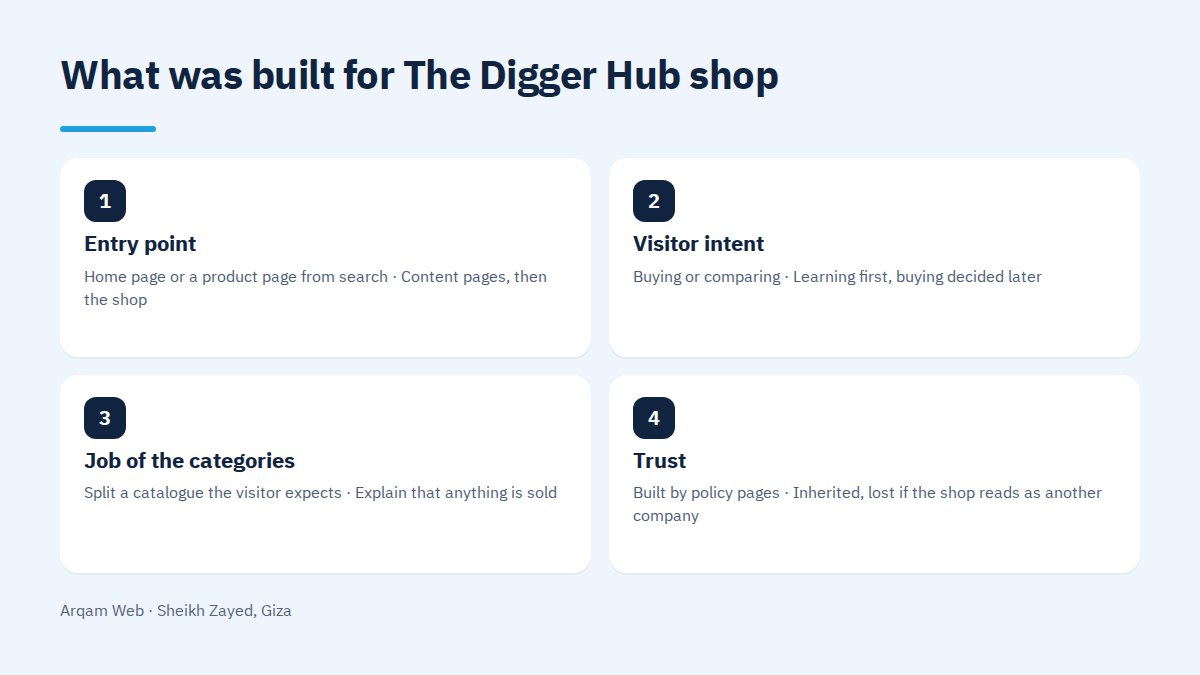
A standalone store greets someone who knows they are in a place that sells. A shop inside an activities site greets someone who came for something else.
| Point of comparison | Standalone store | Shop inside a content site |
|---|---|---|
| Entry point | Home page or a product page from search | Content pages, then the shop |
| Visitor intent | Buying or comparing | Learning first, buying decided later |
| Job of the categories | Split a catalogue the visitor expects | Explain that anything is sold |
| Trust | Built by policy pages | Inherited, lost if the shop reads as another company |
The easy route would have been a separate system. The published decision in The Digger Hub case study went the other way: the shop was built into the structure already there, keeping the same design language and menu, so nobody moving from activities to toys is handed to a different business.
How do you split 120 products across eight categories?
What follows is general practice, not a description of this build. The published figures in The Digger Hub case study are eight categories and 120 products, an average of fifteen each. A category of three items looks unfinished, while one of eighty recreates the problem categories exist to solve.
- Start from how buyers ask, not from how a supplier stores stock.
- One level is enough at this size. A three level tree over 120 products makes pages holding one item.
- One primary category per product, with everything else as attributes you filter by. A product in five categories means little.
- Test the split against real product names before anyone writes code.
One extra factor here: many parents arrive thinking about the activity their child liked, so categories in the language of the site reach them faster.
What makes filtering worth building at this size?
Filtering across 120 products is not a shrunken marketplace. The rules we work to:
- Filter by what the buyer decides on: age range and price band, not a model code.
- Hide a value that returns nothing, since an empty results page reads as a half stocked shop.
- Every filter value must exist in the product data from entry, since filters invent nothing.
- Decide which filtered pages get indexed. Leaving all of them open generates near identical pages.
What do you do about uncategorised products?
This is a common failure in every shop whose catalogue grows, and we raise it as a general principle. A product added in a hurry with no category does not disappear. It lands in a default bucket visitors see under an odd name, or becomes a page nobody reaches while search engines index it.
The fix belongs before launch: a rule blocking any product published without a primary category, a periodic report of those without one, and a decision about discontinued items.
The five published phases of The Digger Hub case study
- Design directions. The newly adopted identity was read first, then several directions were shown instead of one, leaving the balance between playful and credible to them.
- Revisions and approval. The client chose a direction and sent a list of changes, worked through until approval.
- Build and launch. Activities, gallery albums, two branch pages, events, careers and the parent reviews.
- The client returns. A new brief some time after launch: a toy shop inside the existing structure, not beside it.
- Building and testing the shop. 120 products in eight categories with cart, checkout and accounts, plus shipping, return and terms pages, then real purchases end to end.
Why were real purchases run through the checkout?
The project page is direct here. Real transactions went through the shop front to back before it went live, rather than trusting a page that rendered without errors. Payment paths fail in ways a design review never surfaces: a confirmation email that never arrives, an order status frozen after payment.
The steady lesson in The Digger Hub case study is that a shop able to take money is not a finished shop. Shipping, returns, terms and the account area are how a buyer learns what happens after they spend.
What The Digger Hub case study gives you for your own shop
- Decide where the shop sits before choosing technology.
- Write categories in your visitors’ language rather than your supplier’s.
- Work out the average products per category, avoiding empty and bloated ones alike.
- Put the no category, no publish rule in the specification.
- Buy from your own shop before launch with a real card.
- Write the shipping, return and terms pages before launch day.
For different logic, see the Boya Store project, a paint shop where the buyer chooses by colour then by brand. Read types of websites to place your own case, and our projects for others with live links.
Frequently asked questions
What is the short version of The Digger Hub case study?
A children’s activity academy in Cairo received a content site with activities, gallery albums, two branch pages and parent reviews. Some time after launch the client returned, and a shop of 120 products in eight categories was built inside that same site, then tested with real purchases.
Why was the shop not built as a separate site?
Because the published condition was to build it inside the existing structure rather than beside it. A separate store means a second design language, a second menu and a second visitor account, and someone moving from activities to products would feel handed to another company.
How many products does the shop hold, and how is it organised?
120 products across eight categories. Those are the two published numbers, countable on the project page. No traffic, sales or conversion figures sit beside them, because the page publishes none, and a number without a source turns a case study into marketing copy.
Does this model suit a services site that wants to sell products?
The principle transfers in many cases: a training centre selling materials, a clinic selling supplies, a restaurant selling packaged goods. The deciding questions are catalogue size and rate of change. A small stable catalogue fits inside an existing site, while a large one deserves a closer look.
What should I prepare before adding a shop to my site?
A product list with names, prices and clean photographs, a proposed category split in real product names, shipping and return policies agreed internally, the payment methods you accept, and whoever handles orders after launch. That material decides the timeline more than the build itself does.
Add a shop to your site on the same method
Send your site address and product list, and you will get a proposed category split and a written opinion on whether the shop belongs inside your site or the structure needs rebuilding first, on the method behind The Digger Hub case study: structure, build, real purchase.
Request a quote · Message us on WhatsApp · Call us
Arqam Web
44 Central Axis, Al Saraya Mall, Lower Ground, Entrance 2, Sheikh Zayed, Giza, Egypt
Phone and WhatsApp: +20 111 872 1404 · Email: info@arqamweb.com