

Google Tag Manager is one container you install once, after which tracking and advertising codes are added, edited and switched off from a web panel instead of through your developer. It earns its keep when several codes exist and change often. A site with one fixed measurement code does not need it.
What does Google Tag Manager actually do?
It sits between your site and every measuring tool you use. Rather than pasting an analytics code, an ads conversion code and two social pixels into the template one by one, you install a single container. Each code then lives inside the panel with a rule for when it should fire, and publishing a new version pushes the change live in seconds.
The container measures nothing itself. It is a delivery layer, and the numbers stay in whichever tool receives them. People who expect to open the panel and read reports come away confused, because the reports are somewhere else entirely.
When do you genuinely need Google Tag Manager?
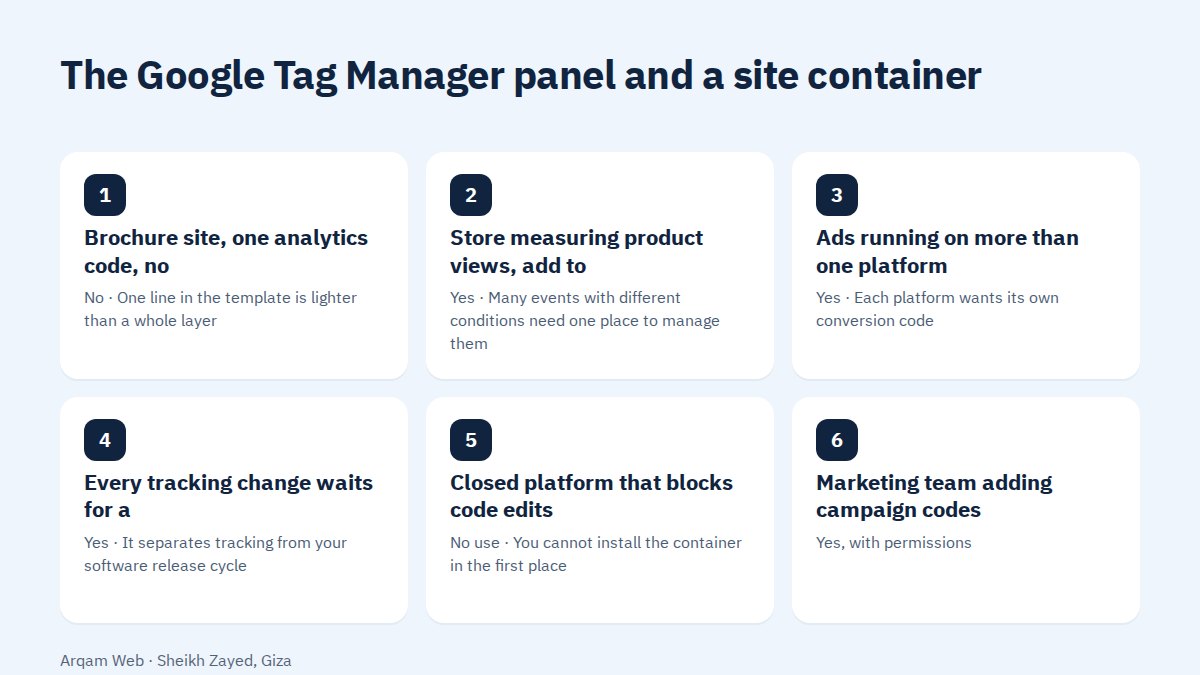
| Situation | Worth a container? | Reason |
|---|---|---|
| Brochure site, one analytics code, no changes | No | One line in the template is lighter than a whole layer |
| Store measuring product views, add to cart and purchase | Yes | Many events with different conditions need one place to manage them |
| Ads running on more than one platform | Yes | Each platform wants its own conversion code |
| Every tracking change waits for a developer slot | Yes | It separates tracking from your software release cycle |
| Closed platform that blocks code edits | No use | You cannot install the container in the first place |
| Marketing team adding campaign codes themselves | Yes, with permissions | Controlled publishing beats loose codes in the template |
When is Google Tag Manager more trouble than it saves?
- A single stable code. Adding a management layer to look after one line is complexity with no return.
- Nobody owns it. A container with no named owner becomes a pile of codes a year later that nobody dares to delete.
- A rebuild is close. Wait until the new site is settled, then set the container up against its final structure.
- One change a year. A developer does that in minutes, while the layer needs attention every month.
Tags, triggers and variables
Three ideas carry the whole panel. A tag is the code that runs, such as an analytics call or an ads conversion. A trigger is the condition that runs it, such as a specific page, a click on a button or a form submission. A variable is a value read at the moment of firing, such as the order total or the page title.
A correct tag needs all three set deliberately. The usual beginner fault is a trigger wide enough to fire on every page, which sends inflated numbers with no obvious cause, and the cause is rarely found on the first look.
How do you set up a first container?
- Create an account and a container named after your site, choose the web platform, and take the ID that starts with
GTM-. - Install both snippets: one in
headand one immediately insidebody. The second covers the case where JavaScript is disabled. - Move your existing measurement code into the container and delete it from the template in the same deployment, not a week later.
- Test in preview mode before publishing. Perform the actions yourself and watch which tags fire and which stay quiet.
- Publish a described version with a title that says what changed, because rolling back means knowing what a version contained.
- Review the container quarterly and delete tags for finished campaigns and tools you have stopped paying for.
Step three is where most people trip. Leaving the old code in the template while adding it to the container means every visit is measured twice, and the resulting numbers look excellent while being wrong.
Does it slow the site down?
The container loads asynchronously, so its own direct cost is small. The weight comes from what you put inside it. Ten tags for tools you no longer use will slow a page down however they are loaded, and the container at least makes that list visible and easy to prune, which a template full of pasted snippets does not.
Treat the tag list the way you would treat a plugin list. See website components for the other things competing for the same page weight.
Who should own the container?
Ownership belongs in your company’s name, under an email account you control. An agency or a developer gets access at container level that you can withdraw at any time. Permissions are split between account level and container level, and edit rights can be granted without publish rights.
That split is what makes Google Tag Manager a management tool rather than a purely technical one. Whoever edits works in their own workspace, and whoever publishes reviews the change before visitors ever see it. On a small team those can be the same person, as long as the review still happens.
Common mistakes with Google Tag Manager
- Installing the
headsnippet and forgetting thebodyone. - Publishing without preview, then learning about the fault from a drop in the numbers days later.
- Tag names like “Tag 1” and “test”, which nobody can decode six months on.
- Granting publish rights to anyone who asks, so no version is ever reviewed.
- Leaving expired campaign codes firing on every page for no reason.
Frequently asked questions
Does Google Tag Manager replace my analytics tool?
No, and the difference matters. The container delivers codes and decides when they run. Collecting the data and showing the reports happens in the analytics tool itself. You need both: one tool that measures and reports, and one container that manages how codes reach your pages. Neither covers the other’s job.
Is it free to use?
The standard version costs nothing, and a normal site or a mid sized store never needs a paid plan. The enterprise edition adds wider permissions, governance controls and finer logs, which matter to large teams with several departments. Most sites never approach the point where upgrading becomes a question.
Do I need a developer to install Google Tag Manager?
You need someone to place two snippets in the template once, which is a few minutes of work for anyone who knows where the template is or has admin access. After that the work happens in the panel with no code, and that is the whole point: changes without waiting for the next release.
What if I publish a broken change?
Every publish is stored as its own version, so you can reopen an earlier one and publish it again, which returns the site to its state before the mistake within minutes. This is exactly why each publish deserves a descriptive title saying what changed and who asked for it, rather than a bare number.
Does a container create privacy obligations?
The container is a delivery mechanism, and the duty stays with what you run inside it and with informing visitors and asking consent before tracking codes that collect personal data run at all. This is general information rather than legal advice, and your own counsel and local law have the final word.
Have your tracking setup reviewed
Send your site address with a list of what you measure today, and we will reply with what belongs in a container and what is better left in the template. See also the web design and development page, your website goal and the pricing page.
The official installation steps are published in the Google Tag Manager help centre.
Request a quote · Message us on WhatsApp · Call us
Arqam Web
44 Central Axis, Al Saraya Mall, Lower Ground, Entrance 2, Sheikh Zayed, Giza, Egypt
Phone and WhatsApp: +20 111 872 1404 · Email: info@arqamweb.com